Transforming Cisco Firepower Logs into Actionable Insights Using Falcon LogScale
Cisco Firepower generates a constant stream of connection, intrusion and malware events. Buried in that syslog feed is exactly what your SOC needs to understand what is crossing the perimeter and which hosts are getting hit. The problem is noise. LogConnector pulls Firepower syslogs into Falcon LogScale, reshapes them into a common schema and routes them into focused indexes so analysts can pivot by host, user or indicator instead of scrolling raw text.
Modern networks rely on Cisco Firepower to provide threat prevention, application control and deep inspection. That level of inspection produces rich telemetry, but without structure and the right search engine it turns into a storage bill instead of a security asset. By streaming Firepower events into Falcon LogScale through LogConnector you get fast search across long retention and the ability to line up firewall activity with endpoint, identity and cloud logs.
Introduction to LogConnector for Cisco Firepower
LogConnector acts as the bridge between your Cisco Secure Firewall deployment and CrowdStrike Falcon LogScale. It handles collection, transformation and delivery so your team is not maintaining fragile syslog relays and ad hoc parsers.
- Ingests connection, intrusion, malware and file events from Cisco Firepower syslog outputs and converts them into cleanly structured events.
- Normalizes key fields like source, destination, ports, actions and threat indicators into the CrowdStrike Parsing Standard so analysts can reuse searches across data sources.
- Applies routing rules that send high volume flow events to capacity friendly indexes and high value detections to security focused indexes, which keeps queries fast and budgets predictable.
Parsing Cisco Firepower logs and turning them into dashboards
The heart of the package is the Cisco Firepower parser. It is designed to understand the different record types the platform emits and to make them searchable without requiring every analyst to memorize the raw syslog format.
The parsers handle the heavy lifting:
- ✕No more hunting through separate syslog streams for connection, intrusion and malware events. They are aligned on common host, network and threat fields.
- ✕Less time fixing timestamps, malformed IPs or odd enum values. Normalization rules keep values consistent so joins and trend charts work out of the box.
- ✕Reduced risk when Cisco adds new fields. The CPS layout gives you a predictable place to map them without rewriting existing searches.
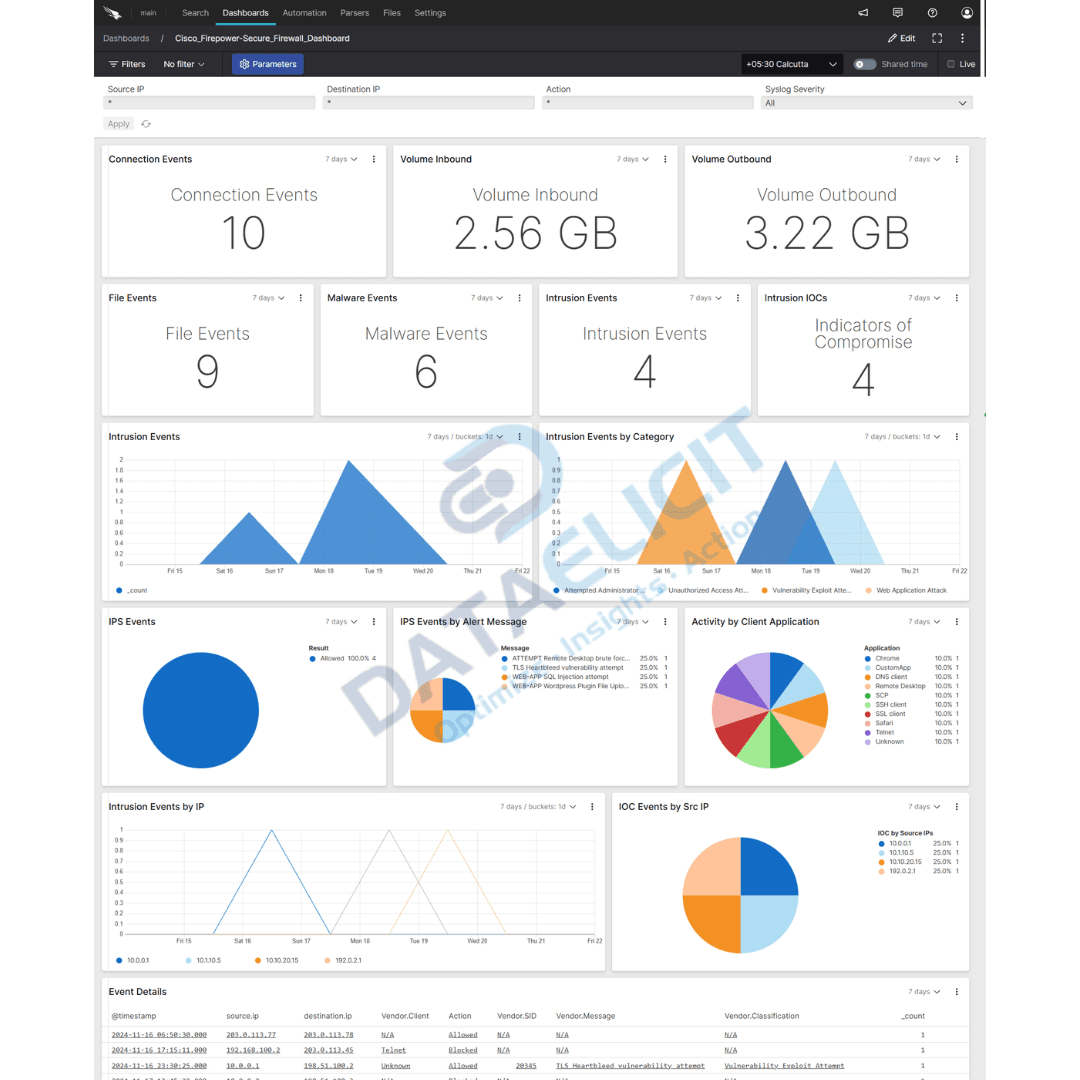
On top of the parsers sit pre built Falcon LogScale dashboards:
- ✓Connection overview panels that show who is talking to whom, which ports are busiest and how traffic volume changes over time.
- ✓Malware and intrusion views that surface signatures, target hosts, indicators of compromise and noisy sources that need tuning or investigation.
- ✓File and data transfer dashboards that highlight large transfers, unusual destinations and applications that push the most volume.
- ✓A base to correlate Cisco Firepower events with other Falcon LogScale sources such as DNS, proxy or endpoint telemetry.
When these dashboards are in place, Cisco Firepower logs stop being an opaque syslog stream and turn into concrete entry points for questions like which host triggered the last burst of intrusion alerts or which application is behind a sudden jump in outbound traffic.
Conclusion
Falcon LogScale plus LogConnector and the Cisco Firepower package give you a practical way to use firewall logs instead of just archiving them. With structured ingestion, common schemas and dashboards that match how security teams think, you can improve network visibility, respond faster to threats and show clear value from the firewall infrastructure you already run.
Ready to dive deeper?
The examples here cover the core patterns. On real projects we help customers decide which Cisco Firepower sources to onboard, how long to retain them in Falcon LogScale and which questions matter most for their SOC and network operations teams.
Once ingestion is stable and dashboards are tuned you can track concrete improvements like faster triage for intrusion alerts, fewer blind spots in traffic analysis and better evidence when you need to justify firewall and logging spend.
Talk to the team
Need help making sense of your Cisco Firepower logs?
We work with security and network teams to stand up LogConnector driven pipelines from Cisco Firepower into Falcon LogScale, with parsers and dashboards that match how your network is actually designed.
Get in touch with us today
to learn more about:
- ›LogConnector features and benefits
- ›The Cisco Firepower package for Falcon LogScale
- ›How LogConnector and Falcon LogScale can enhance your IT and security operations
If Cisco Firepower already sits in front of your critical traffic you are generating a huge amount of valuable telemetry. With LogConnector and Falcon LogScale you can turn that stream into something that speeds up troubleshooting, incident response and compliance checks instead of another storage problem.
Featured Articles
Explore more integration guides and packages that combine LogConnector with Falcon LogScale for richer security analytics.
Gain Unified Visibility Across Your Infrastructure with Zabbix Add On for Splunk
Use Zabbix telemetry inside Splunk to track health, alerts and performance from a single analytics surface.
Read More
Enhance Your Network Visibility with Auvik Networks Add On for Splunk
Stream Auvik network data into Splunk so operations teams can see topology, traffic and alerts together.
Read More
Turn Box Logs into Actionable Insights with LogConnector and CrowdStrike
Centralize Box activity logs in Falcon LogScale with LogConnector to monitor access, sharing and file risk.
Read More