Route Jira Logs to CrowdStrike Falcon LogScale with LogConnector
Jira holds the story of how work actually moves through your teams, but raw logs rarely show up in the SOC. By pairing LogConnector with Falcon LogScale, you normalize Jira audit and issue data, control ingestion cost and get dashboards that let security and platform owners spot risky changes, stalled work and misused projects in a few clicks.
Efficient log management and real time visibility into platform activity are critical for Jira administrators and product owners. CrowdStrike Falcon LogScale gives you the speed to search across those events, but it needs structured inputs. LogConnector acts as the bridge between Jira and Falcon LogScale so that onboarding Jira logs does not depend on custom scripts or one off exports that break whenever an admin changes a setting.
Introduction to LogConnector
LogConnector is a custom application that connects your Jira environment to Falcon LogScale and handles collection, transformation and routing. It lets you standardize how logs flow into Falcon so that operations, security and engineering teams all work off the same data model instead of competing exports.
- Connects to Jira log streams and pulls audit and issue events into a consistent schema across projects and spaces.
- Adds light enrichment so teams can pivot by project, assignee, issue type, component, status or priority without complex joins.
- Routes only the events and fields that matter into Falcon LogScale indexes, helping you keep ingestion clean and budget friendly.
Effortless onboarding and powerful analysis of Jira logs with Jira connector
The Jira connector inside LogConnector makes it simple to bring project and issue activity into Falcon LogScale and treat it like any other security or operations telemetry. Clean indexes and focused dashboards give you a single view across how work is created, updated and closed, so you can catch risky changes and noisy patterns early.
Jira connector allows you to pull:
- ✓Jira audit logs for configuration and workflow changes.
- ✓Jira issues data so you can track projects, assignees, statuses, transitions and time spent.
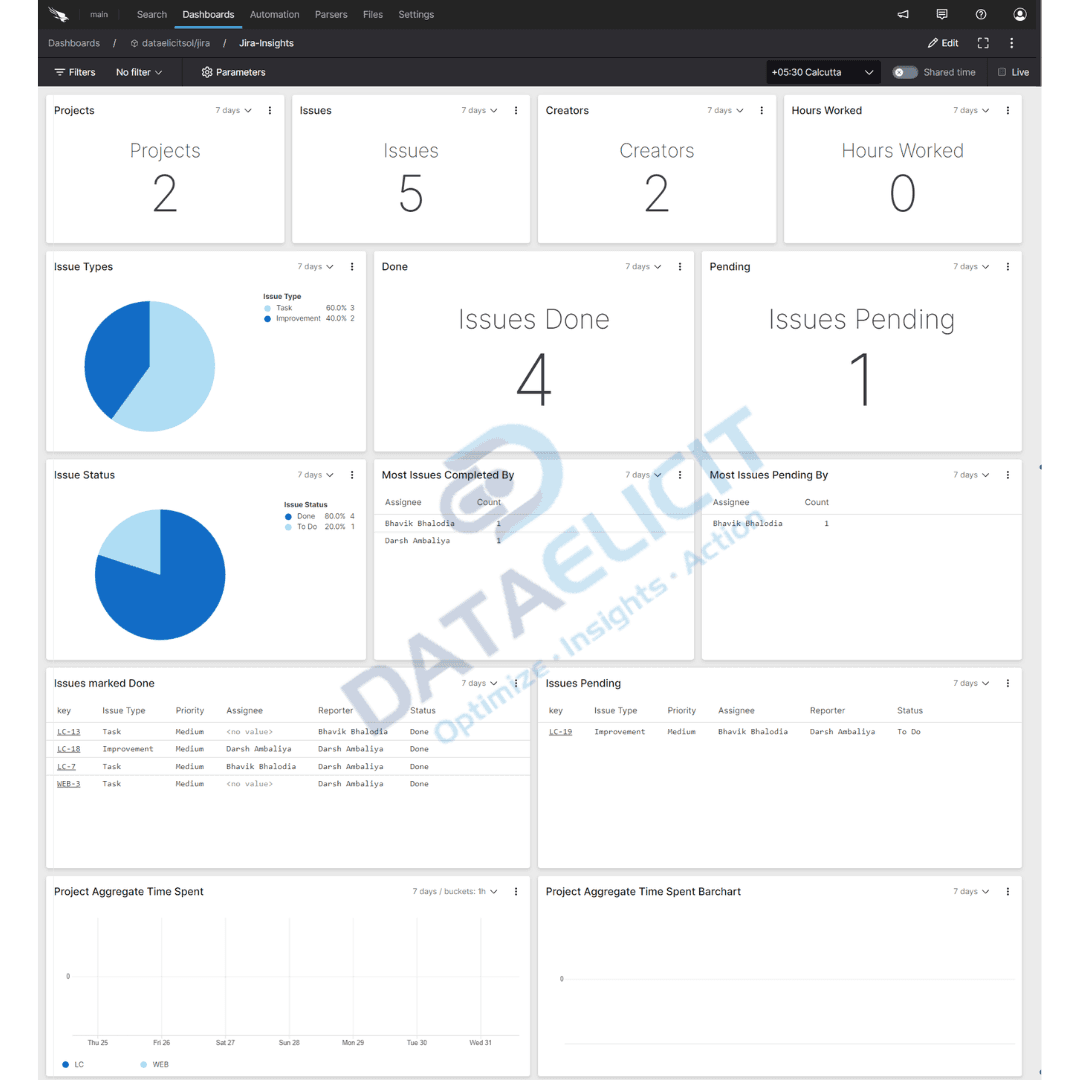
Once Jira events are normalized through LogConnector and landed in Falcon LogScale, the Jira dashboards become a real operations console. Teams can visualize key metrics, follow project health, inspect audit trails and tie Jira activity back to incidents and change windows already tracked in Falcon.
Conclusion
When Jira underpins project delivery, having clear visibility into how issues move is essential for informed decisions. DataElicit Jira connector plus LogConnector and Falcon LogScale give you a unified way to ingest, normalize and analyze Jira logs without homegrown plumbing. With this stack, teams can streamline onboarding, gain meaningful insights into their Jira environment and improve both delivery and operations.
Ready to dive deeper?
This article covers the core pattern. In real projects we help teams tune routing, index layout and dashboards so Jira data fits with the rest of their observability and security stack instead of sitting off to the side as a separate reporting tool.
With LogConnector standardizing how Jira logs land in Falcon LogScale, you get predictable ingestion, high performance searches and a reliable view of how work flows across teams. That is usually the point where Jira stops being just a ticket system and becomes an operational signal source.
Talk to the team
Need help operationalizing Jira telemetry?
We work with platform, product and security teams to design practical pipelines, tune dashboards and keep Falcon LogScale fast as you add more Jira projects and other tools into the mix.
Get in touch with us today
to learn more about:
- ›LogConnector features and benefits
- ›The Jira connector and its capabilities
- ›How LogConnector and Falcon LogScale can enhance IT and security operations
Related Articles
Explore more guides on integrating SaaS platforms and cloud services with LogConnector and Falcon LogScale.
Turn Box Logs into Actionable Insights with LogConnector and CrowdStrike
Bring Box activity and access logs into Falcon LogScale so you can see which content is used, shared or exposed in real time.
Read More
Cost Efficient EventHub to Falcon LogScale Ingestion with LogConnector
Route Azure EventHub streams into Falcon LogScale with clean schemas, throttling controls and predictable ingestion cost.
Read More
Route 1Password Logs to CrowdStrike Falcon LogScale with LogConnector
Protect sensitive access data by routing 1Password logs into Falcon LogScale with normalized fields and focused dashboards.
Read More