Route 1Password Logs to CrowdStrike Falcon LogScale with LogConnector
1Password is where people hide the keys to everything else, so when something goes wrong there, it is already serious. The audit and usage logs are strong signals, but they usually live in a separate place from the rest of your security stack. By sending 1Password telemetry through LogConnector into Falcon LogScale, you get fast searches, consistent fields and dashboards that actually highlight risky behavior instead of another pile of JSON exports.
Password managers became mandatory the moment everyone was told to stop reusing passwords while also remembering dozens of them. 1Password centralizes those secrets, devices and sign in flows, which means its logs capture who accessed what, from where and on which device. The problem is that SOC and IT teams often have to swivel between 1Password, identity providers and endpoint tools to see a full story. Falcon LogScale gives the speed and retention you want, but you still need a clean way to collect and shape those 1Password events. That is exactly what LogConnector is built for.
Introduction to LogConnector
LogConnector is a custom application that connects 1Password and other platforms to CrowdStrike Falcon LogScale. It manages authentication, collection and transformation so engineers are not maintaining fragile scripts every time someone asks for a new field or data stream.
- Normalizes audit, usage and sign in events into consistent schemas so you can reuse searches and dashboards across tenants.
- Adds simple enrichment, such as app context or risk flags, so analysts can slice activity without building endless lookup tables.
- Routes only the important 1Password events into Falcon LogScale so you keep ingestion and retention aligned with cost and compliance targets.
Effortless onboarding and powerful analysis of 1Password logs with 1Password connector
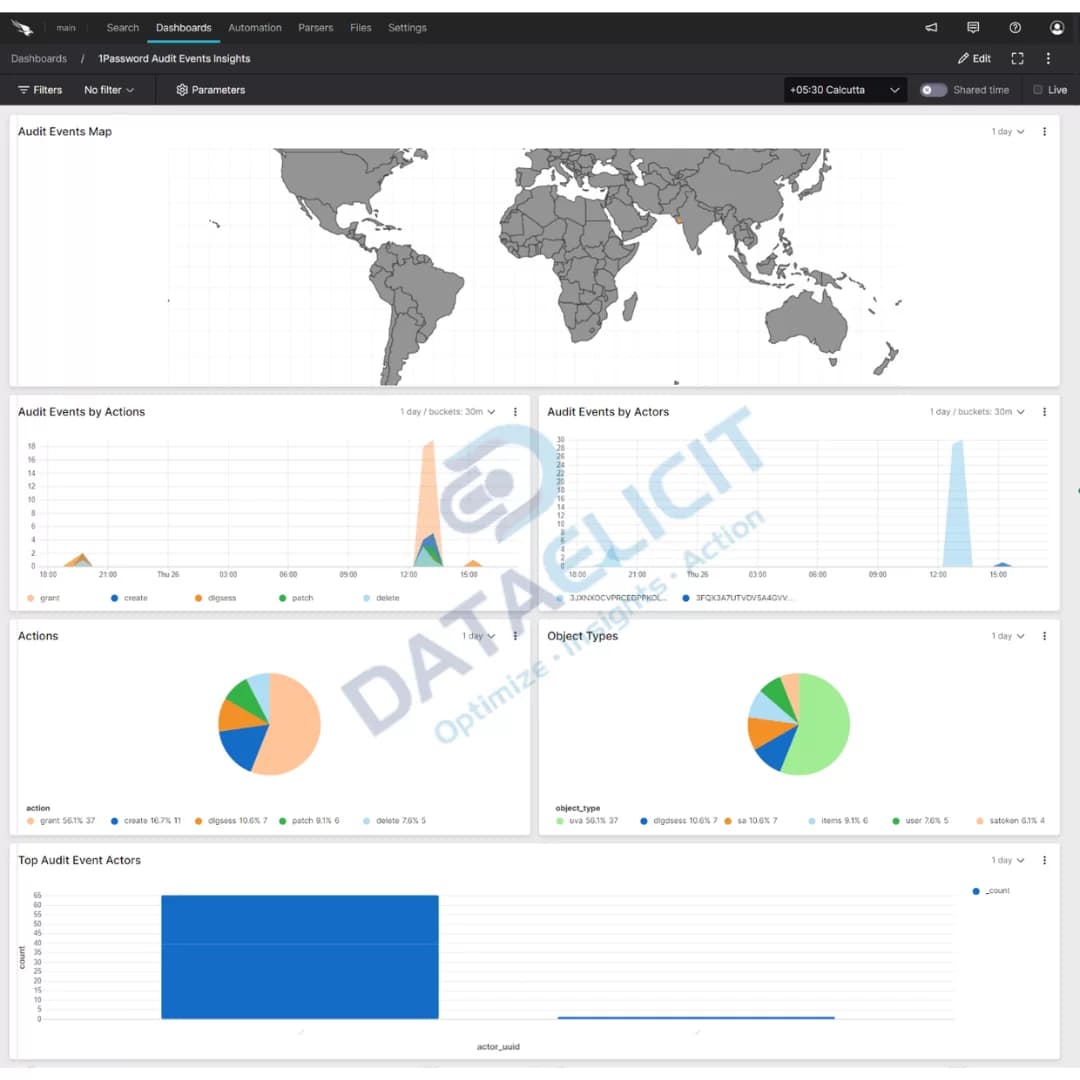
With the 1Password connector configured inside LogConnector, you can stream password manager telemetry into Falcon LogScale without extra glue code. Analysts get a live picture of vault usage, risky sign ins and item access patterns in the same place they already investigate endpoint and identity events.
1Password connector allows you to pull:
- ✓Audit events that track changes to vaults, users, policies and administrative actions.
- ✓Item usage data that shows which secrets and vaults are being accessed, by whom and how often.
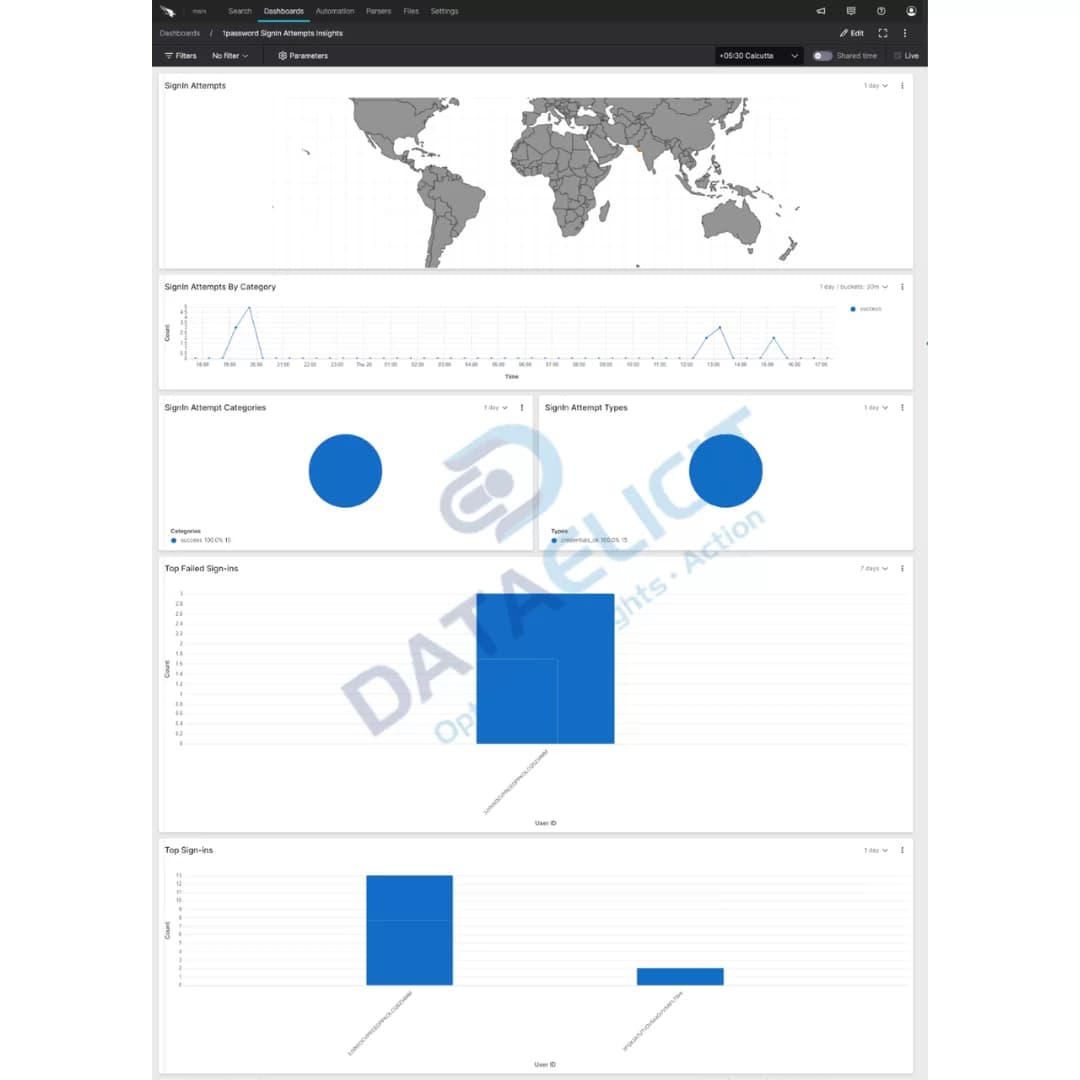
- ✓Sign in attempts so you can spot unusual login locations, repeated failures or suspicious device patterns.
Once these streams are standardized through LogConnector and indexed into Falcon LogScale, the 1Password dashboards turn into a focused view of how your secrets are used. SOC teams can correlate suspicious logins with vault activity, investigate privilege misuse and prove that password hygiene controls are actually working.

Conclusion
When attackers target accounts, they eventually care about where the real secrets live. 1Password logs give you that lens, but only if they are easy to search and correlate with everything else in your environment. DataElicit 1Password connector, paired with LogConnector and Falcon LogScale, gives you a single path to ingest, normalize and analyze that data at scale. The result is faster investigations, clearer audit trails and fewer blind spots around the systems that protect your credentials.
Ready to dive deeper?
This article covers the main building blocks. In real projects, we help customers wire up routing rules, build 1Password specific indexes and shape dashboards that reflect how their SOC, IAM and compliance teams actually work.
With LogConnector handling the plumbing, 1Password telemetry lands in Falcon LogScale in a predictable format. That means simpler alerting, better reports for auditors and a lot less manual export and spreadsheet work for your security teams.
Talk to the team
Need help operationalizing 1Password telemetry?
We work with security and IAM teams to design 1Password ingestion pipelines, refine dashboards and keep Falcon LogScale responsive as you add more secrets, users and devices.
Get in touch with us today
to learn more about:
- ›LogConnector features and benefits
- ›The 1Password connector and its capabilities
- ›How LogConnector and Falcon LogScale can enhance IT and security operations
Featured Articles
Explore more guides, integrations and use cases powered by LogConnector and Falcon LogScale.

Route GitHub Logs to CrowdStrike Falcon LogScale with LogConnector
Pull Github audit data into Falcon LogScale so security teams can see code, identity and endpoint in one place.
Read More
Route Okta Logs to CrowdStrike Falcon LogScale with LogConnector
Normalize Okta authentication and identity telemetry so Falcon LogScale can answer hard questions fast.
Read More
Route Jira Logs to CrowdStrike Falcon LogScale with LogConnector
Ingest Jira audit and issue activity into Falcon LogScale so project and security teams share one timeline.
Read More