
Route Azure Logs to CrowdStrike Falcon LogScale with LogConnector
Azure generates a constant stream of audit, platform and resource logs. LogConnector standardizes those feeds and pushes them into CrowdStrike Falcon LogScale so your teams get a consistent schema, faster queries and fewer blind spots in cloud operations.
To keep cloud operations smooth in a data driven environment, teams have to ingest, analyze and act on Azure logs quickly. CrowdStrike Falcon LogScale gives you a high speed engine for search and analytics. LogConnector sits in front of it and makes life easier by handling the messy part, onboarding multiple Azure data sources and turning them into clean signals that your teams can trust.
Introduction to LogConnector
LogConnector is a custom application that bridges your environment and Falcon LogScale. Available for common Linux distributions, it gives you a single place to configure organizations, tenants and connectors, instead of gluing together scripts and one off pipelines for every new Azure data source.
- Effortlessly configure your Falcon LogScale organization once and reuse that configuration for all your connectors.
- Install and manage connectors for multiple data sources, including Azure, without rebuilding ingestion each time.
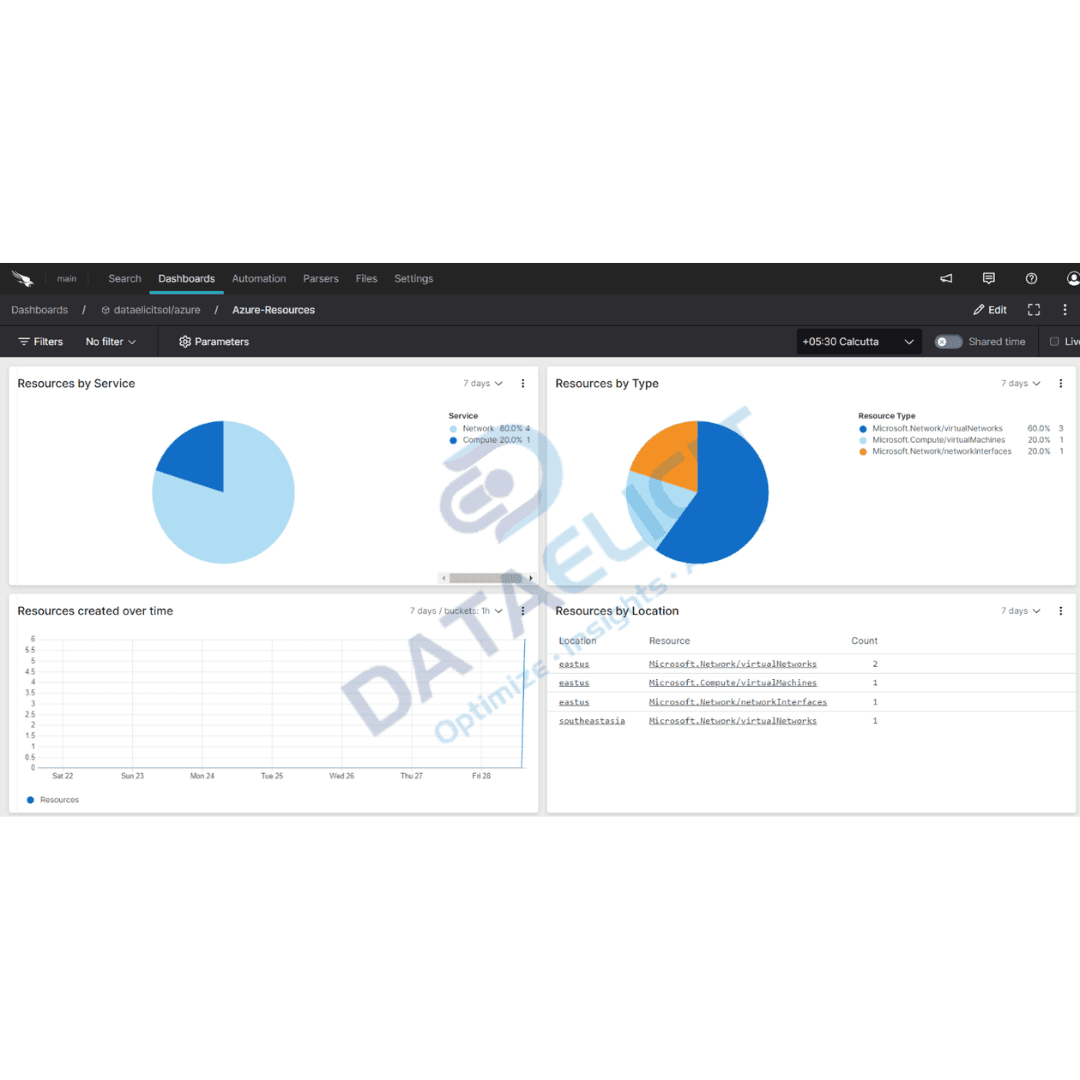
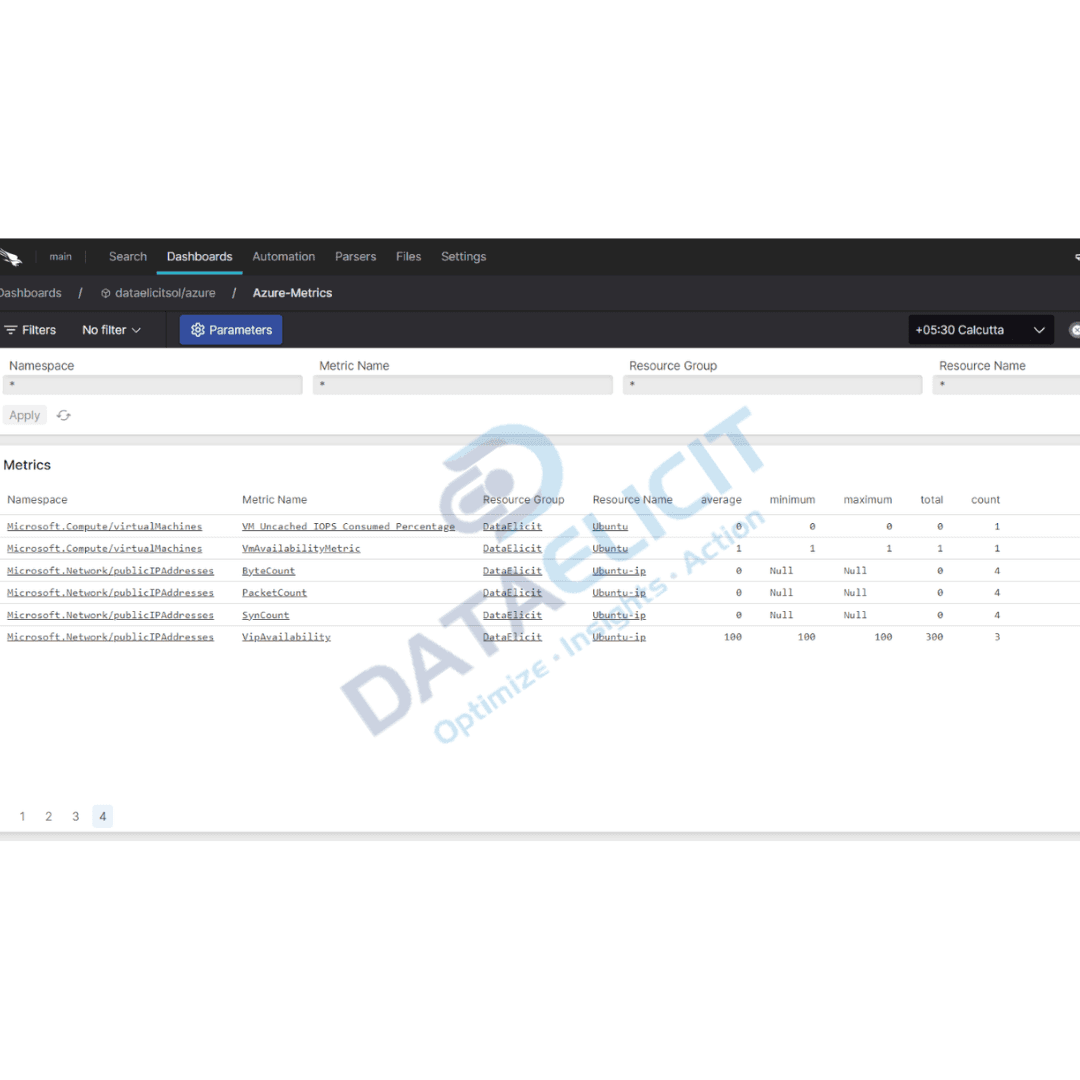
- Use prebuilt dashboards and schemas that are designed to surface the most important metrics and security insights.
Effortless onboarding and powerful analysis of Azure logs
The Azure connector pulls rich telemetry from your Azure environment into Falcon LogScale, so you are not jumping between portals to piece together what is happening. Once data flows through LogConnector, you can rely on structured dashboards for performance, configuration and security.
Azure connector allows you to pull:
- ✓Azure Audit Logs.
- ✓Data from your Storage Blobs and Storage tables.
- ✓Metadata for your Azure resources.
- ✓Metrics data for your Azure resources.
- ✓KQL query based logs for deeper analysis.
- ✓EventHub logs for streaming workloads.
Once Azure logs are ingested into Falcon LogScale, cloud admins can see configuration drift, performance trends and security issues from a single pane, and take proactive steps instead of reacting after users complain.
Conclusion
Efficient cloud administration is essential if you want productivity and a secure, compliant Azure environment. CrowdStrike Falcon LogScale, combined with LogConnector and the Azure connector, provides a full stack for ingesting, analyzing and leveraging Azure logs. By following the approach in this guide, teams can accelerate onboarding, gain clear insights into their Azure accounts and optimize day to day cloud operations.
Ready to dive deeper?
This article gives a high level view. In real deployments, LogConnector and Falcon LogScale work together to remove log ingestion complexity, while prebuilt connectors and dashboards keep Azure data usable and repeatable instead of ad hoc.
At DataElicit, we focus on helping teams unlock the full value of their security and cloud data, and support them through the implementation so they are not left alone with a diagram and a wish.
Get in touch with us today to learn more about
- ›LogConnector features and benefits.
- ›The Azure connector and its capabilities.
- ›How LogConnector and Falcon LogScale can enhance your IT and security operations.
Do not wait to take control of your Azure logs. LogConnector and Falcon LogScale help you detect issues earlier, standardize analysis and turn noisy signals into clear insight.
Related Articles
Explore more guides on how LogConnector and Falcon LogScale work with other critical SaaS and identity platforms.

Route 1Password Logs to Crowdstrike’s Falcon LogScale with LogConnector
Protect sensitive identity data by routing 1Password logs into Falcon LogScale with LogConnector for faster detection and investigations.
Read More
Route GitHub Logs to Crowdstrike’s Falcon LogScale with LogConnector
Bring GitHub audit and activity data into Falcon LogScale with LogConnector so code, access and security events sit in one place.
Read More
Route Okta Logs to Crowdstrike’s Falcon LogScale with LogConnector
Unify Okta identity telemetry with the rest of your security data in Falcon LogScale using LogConnector’s prebuilt connector.
Read More