Route GitHub Logs to CrowdStrike Falcon LogScale with LogConnector
Github now sits at the center of most engineering work, which means its audit and repository logs are a goldmine for security teams. The problem is that these events live in one console, identity events in another and endpoint alerts somewhere else. With LogConnector feeding Github logs into Falcon LogScale, you get a single place to investigate code, identity and endpoint activity with clean, well structured events.
When attackers want long term access, they aim for your code and CI pipeline. Github holds that entire history in its audit and repository logs. The challenge is that these logs are noisy, nested and not shaped for fast threat hunting. Falcon LogScale gives you the speed and time range you want, but you still need a cleaner path from Github to indexes, fields and dashboards. This is where LogConnector does the heavy lifting.
Introduction to LogConnector
LogConnector acts as the bridge between Github and CrowdStrike Falcon LogScale. It handles log pull, transformation and routing so engineers are not maintaining one more brittle script every time a new repo, org or event type is added.
- Normalizes Github audit, org and repo events into a consistent schema so searches and dashboards behave the same across teams and environments.
- Adds context such as repo ownership, team tags and critical project flags so analysts can sort real risk from background noise fast.
- Routes only the events and attributes that matter into Falcon LogScale, which keeps ingestion costs controlled and dashboards focused on useful signals.
Effortless onboarding and powerful analysis of Github logs with Github connector
Once the Github connector is configured inside LogConnector, log collection becomes a background task. Security and platform teams can stay inside Falcon LogScale while still seeing who changed which repo, what secrets were rotated and how workflows behave over time.
Github connector allows you to pull:
- ✓Github audit logs that track authentication, permission changes, org level actions and sensitive settings.
- ✓Repository activity such as pushes, branch operations and pull request events that show how code is flowing.
- ✓User and team context so you can see which identities and groups are touching critical services and pipelines.
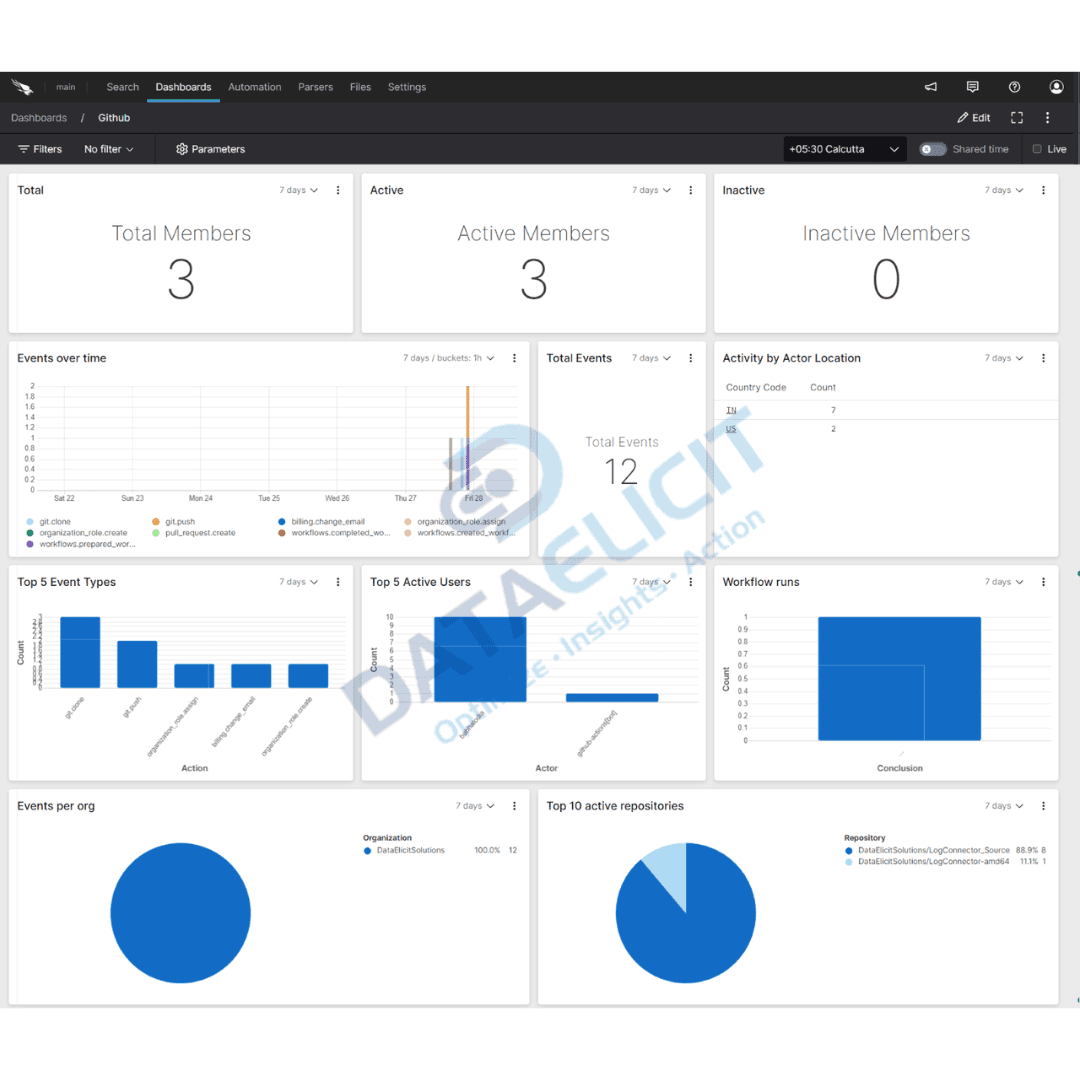
After these streams are normalized through LogConnector and indexed in Falcon LogScale, the Github dashboards become a control room for code and workflow security. You can spot unusual repo access, sudden permission escalations or suspicious automation changes and tie them to devices and threats already tracked in Falcon.
Conclusion
When everything runs through Github, losing line of sight on its logs is not an option. DataElicit Github connector plus LogConnector and Falcon LogScale give you a shared pipeline for ingesting, normalizing and analyzing that data without custom plumbing. With this stack in place, security and platform teams can catch code path abuse earlier, check workflow changes faster and keep Github in step with wider security operations.
Ready to dive deeper?
This article covers the core patterns. On real projects we help clients shape Github indexes, decide which orgs and repos should get premium retention and wire dashboards that match how their security and platform teams actually work.
With LogConnector keeping the data model consistent, Github telemetry lands in Falcon LogScale in a predictable format. That means faster searches, better correlation with endpoint and identity data and less time chasing missing fields in JSON.
Get in touch with us today
to learn more about:
- ›LogConnector features and benefits
- ›The Github connector and its capabilities
- ›How LogConnector and Falcon LogScale can enhance IT and security operations
Featured Articles
Explore more guides, integrations and use cases powered by LogConnector and Falcon LogScale.
Route Jira Logs to CrowdStrike Falcon LogScale with LogConnector
Track Jira project activity, assignee behavior and issue trends inside Falcon LogScale alongside endpoint data.
Read More
Turn Box Logs into Actionable Insights with LogConnector and CrowdStrike
Bring Box access telemetry into Falcon LogScale so you can see which files, folders and users are actually risky.
Read More
Cost Efficient EventHub to Falcon LogScale Data Ingestion with LogConnector
Send Azure EventHub streams into Falcon LogScale with controlled schemas, routing and cost visibility.
Read More