
Turn Corelight Data into Security Intelligence with CrowdStrike Falcon LogScale
Corelight turns packet data into rich network logs based on Zeek. That telemetry is ideal for threat hunting, lateral movement detection and incident response, but only if analysts can actually query it at scale. When LogConnector streams that data into Falcon LogScale with a clean schema, you get fast searches, dashboards that match how analysts think and the ability to correlate network evidence with endpoint and identity signals in seconds instead of minutes.
Most security teams want deeper network visibility, not more packet captures. Corelight solves the telemetry side by turning raw traffic into structured logs that describe protocols, connections and file activity. The problem is that those logs can still be hard to work with in generic storage systems. The Corelight package for Falcon LogScale focuses on one job: take that stream of network events and shape it into structured data that analysts can pivot on, correlate and visualize without fighting the format.
Highlights of the Corelight parser
The Corelight parser inside LogConnector restructures Zeek style events into a consistent schema aligned with the CrowdStrike Parsing Standard. It promotes key identifiers such as IP addresses, ports, protocol names, detection scores and timestamps into stable fields so searches stay predictable when data volumes grow.
Today the parser supports parsing and normalization for event families like Connections, DNS, Files, HTTP, RDP, Kerberos, SSH, SMTP, SMB, software and VPN activity, SSL or x509 and more. By mapping data into these domains, security practitioners can run targeted queries, correlate behaviors and hunt across multiple network layers without building every search from scratch.
- Structures connection records into clear client and server roles so you can see who is talking to what and spot suspicious communication paths quickly.
- Normalizes DNS, HTTP and SSL views so rare domains, odd user agents and certificate anomalies stand out without heavy query tuning.
- Keeps file, SMB and software insights available for cases where you need to trace how data moved, which hosts touched it and whether anything crossed expected boundaries.
Dashboards that drive insight
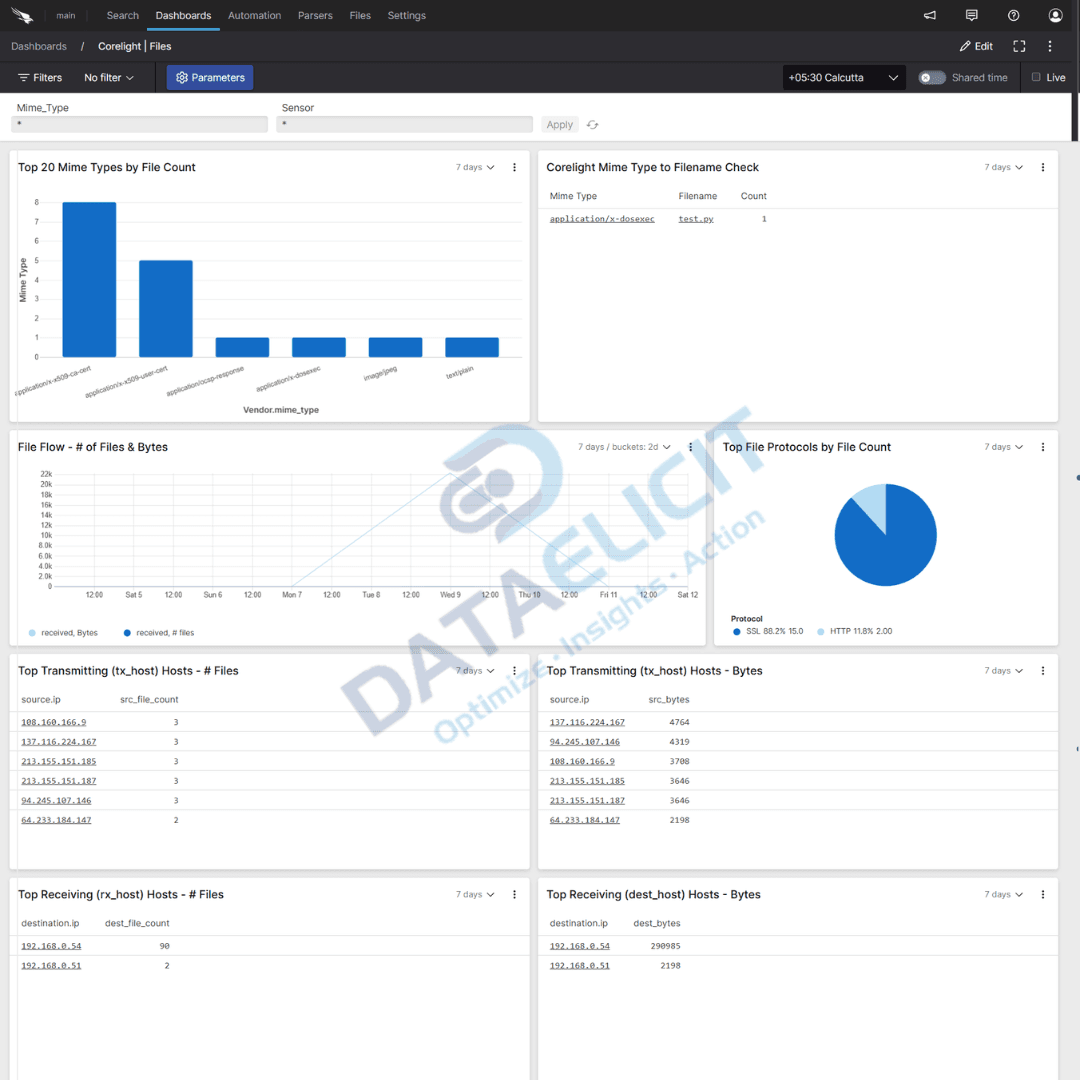
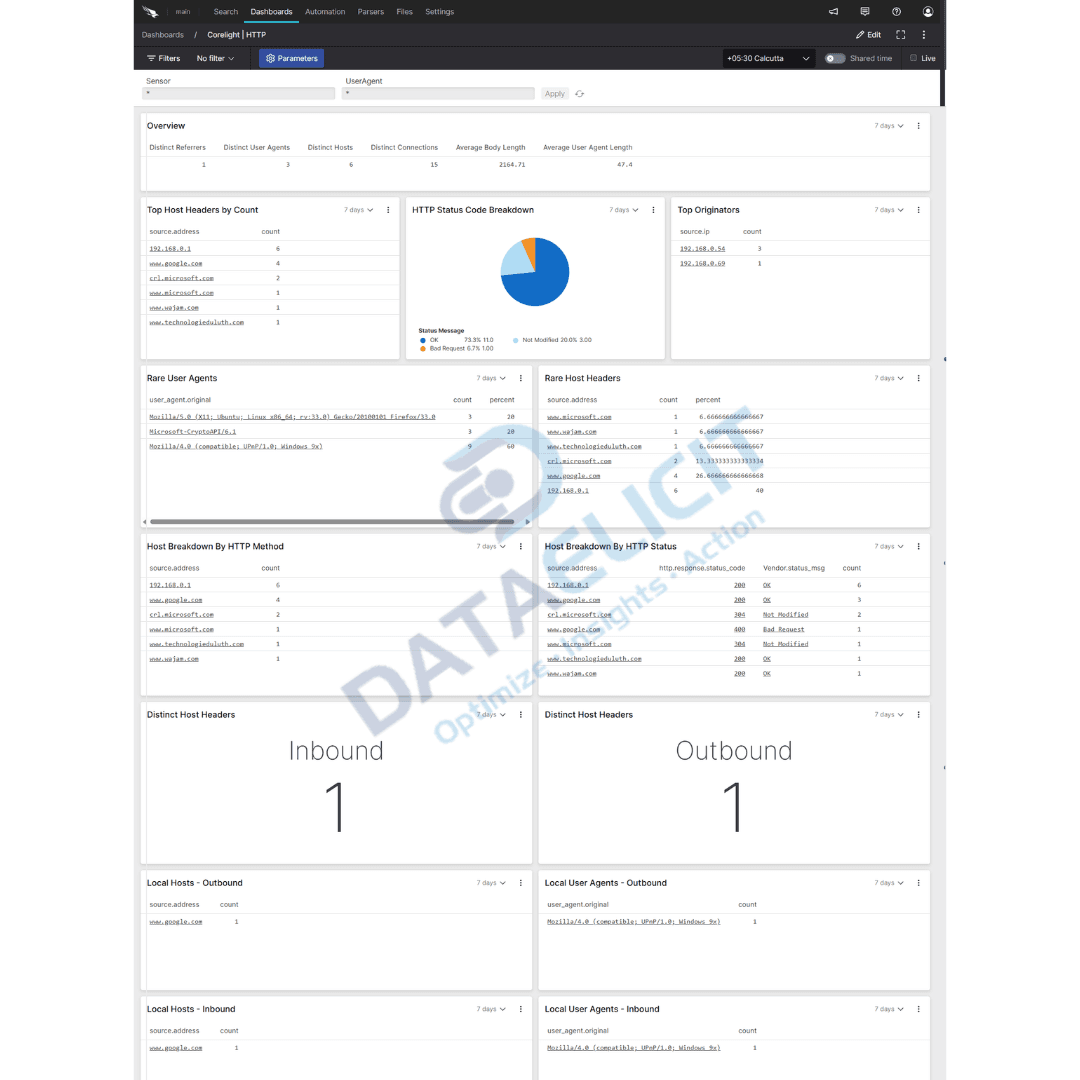
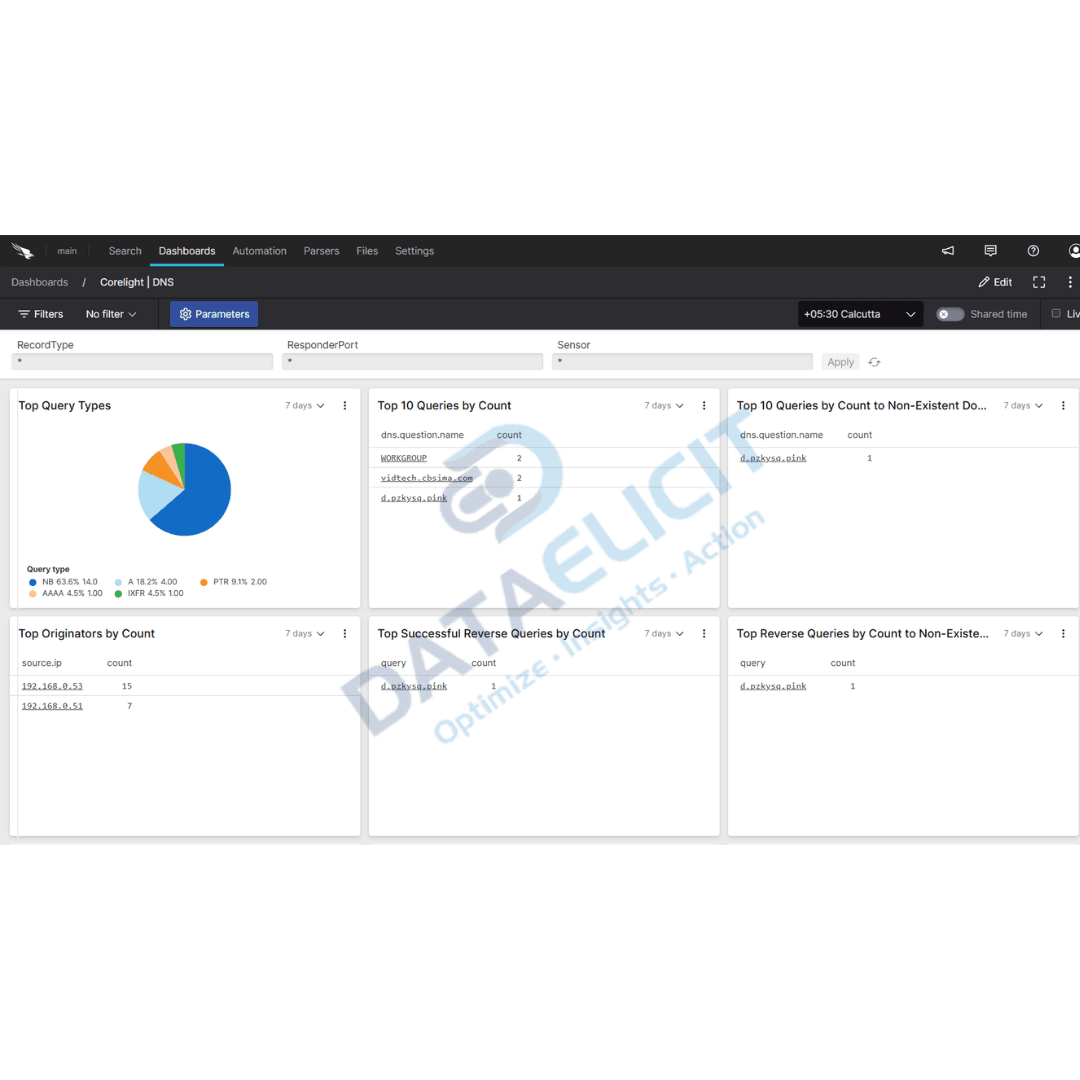
To keep analysts out of raw search for every question, the package ships with Corelight dashboards focused on the views that matter most. They are light enough to customize but strong enough to drop into production and start using immediately.
The standard dashboard set includes:
- ✓Connections views that highlight top talkers, internal or external pairs and unusual paths useful for lateral movement investigations.
- ✓Data Insights dashboards that summarize volumes, file flows and protocol breakdowns so you can spot exfiltration or misuse patterns at a glance.
- ✓DNS and HTTP panels that surface suspicious destinations, rare combinations and beacon like activity without digging through raw logs.
- ✓Security workflow, software and SSL views that combine detections, certificate usage and investigative context for quicker incident handling.
Each dashboard is built to support faster detection and response. With Corelight data in Falcon LogScale your team can use one console for high level trends and detailed drilldowns instead of bouncing between packet tools and SIEM screens.

Why this matters
Many teams already collect Corelight logs somewhere but still struggle to answer basic questions quickly. Queries are slow, field names are inconsistent and correlating findings with endpoint or identity data takes too much effort. With LogConnector feeding Corelight into Falcon LogScale you get structured events, fast searches and a way to mix network signals with the rest of your security stack in a single place. That cuts investigation time and gives you a more complete view of how attackers move across the environment.
Conclusion
Network telemetry is too valuable to sit in hard to use logs. The Corelight package for Falcon LogScale turns that stream into structured events, practical dashboards and search patterns you can rely on every day. Instead of treating packet data as a last resort, your analysts can use it as a primary signal for threat hunting, detection tuning and post incident review. With Corelight data landing through LogConnector you are not just storing network logs, you are building a durable source of truth about what really happened on the wire.
Ready to dive deeper
Every network is wired a little differently. On projects we help teams decide which Corelight logs to prioritize, how to balance detail against volume and how to connect network dashboards with identity, endpoint and cloud views. The goal is a setup that gives fast answers to real questions instead of a mountain of unused telemetry.
Get in touch with us today
We work with security and networking teams that already trust Corelight for deep visibility but want cleaner analytics in Falcon LogScale. That usually means quicker answers during incidents, clearer views of east west traffic and stronger evidence when explaining threat coverage to leadership.
Once ingestion and parsing are steady you can track concrete improvements like reduced time to understand new attack paths, better visibility into noisy segments and easier justification of investments in network detection.
Talk to the team
Want Corelight data to actually work for you
We design and support LogConnector pipelines that bring Corelight telemetry into Falcon LogScale with tested parsers, dashboards and alerting patterns that match how your environment is built.
Get in touch with us today
to learn more about:
- ›LogConnector features and benefits
- ›Corelight package for Falcon LogScale
- ›How LogConnector and Falcon LogScale can enhance your IT and security operations
Related Articles
Explore more integration guides where LogConnector streams data into Falcon LogScale with normalized fields and ready to use dashboards.
Turn Box Logs into Actionable Insights with LogConnector and CrowdStrike
Stream Box audit and access logs into Falcon LogScale through LogConnector so security teams can investigate file access and sharing next to endpoint activity.
Read More
Introducing DS Management App: A Faster Alternative to Splunk Forwarder or Agent
Use the DS Management App to control deployment server, serverclasses and app pushes from one place instead of editing config files on repeat.
Read More
Enhance Certificate Audit Visibility with the DigiCert One Add-on for Splunk
Bring DigiCert One certificate inventory and events into Splunk so you can track issuance, expiry and risky usage from a single view.
Read More