
Transforming 1Password Kolide Logs into Actionable Insights Using Falcon LogScale
Kolide device trust sits between users and critical applications, checking whether laptops and desktops are actually in a secure state before access is granted. Those checks generate detailed audit and authentication logs, but they are painful to use in isolation. LogConnector continuously pulls Kolide events into Falcon LogScale, normalizes them to a common schema and routes them into focused indexes so security and IT teams can answer questions instead of staring at raw JSON.
In a world where users sign in from all kinds of devices, knowing which laptops actually meet your standards is as important as the password itself. Kolide focuses on that device trust layer by running checks for disk encryption, OS version, endpoint tools and risky settings, then feeding the results into access decisions. The result is a stream of logs that explain who tried to reach what, from which device and whether that device passed your rules. On their own these logs are noisy. Combined with Falcon LogScale they turn into a fast, structured history of access and posture that your security and IT teams can search in seconds.
Introduction to LogConnector for Kolide
LogConnector handles the plumbing between your Kolide environment and CrowdStrike Falcon LogScale. Instead of building and babysitting custom scripts, you get a managed pipeline that deals with authentication, cursor tracking, batching and error handling.
- Pulls audit and authentication event streams from Kolide and flattens them into clean, consistent records.
- Normalizes fields into the CrowdStrike Parsing Standard layout so you can search by familiar names like
userordevice_idinstead of product specific labels. - Routes events into separate indexes for operations, security and compliance so teams can query what they care about without stepping on each other or wasting storage.
Parsing Kolide logs and turning them into dashboards
The heart of the package is the Kolide parser set. These parsers are written to understand how Kolide structures audit and auth events and to make that data readable without every analyst learning the vendor schema from scratch.
The parsers handle the heavy lifting:
- ✕No more guessing which event explains a denied session. Access attempts, device checks and policy outcomes are tied together through shared user and device fields.
- ✕Less time cleaning values. Timestamps, IP addresses, usernames and device identifiers are normalized so joins and trend charts work the same way across sources.
- ✕Fewer surprises when Kolide introduces new fields. The CPS layout gives those fields a predictable home without breaking existing searches and alerts.
On top of the parsers you get pre built Falcon LogScale dashboards:
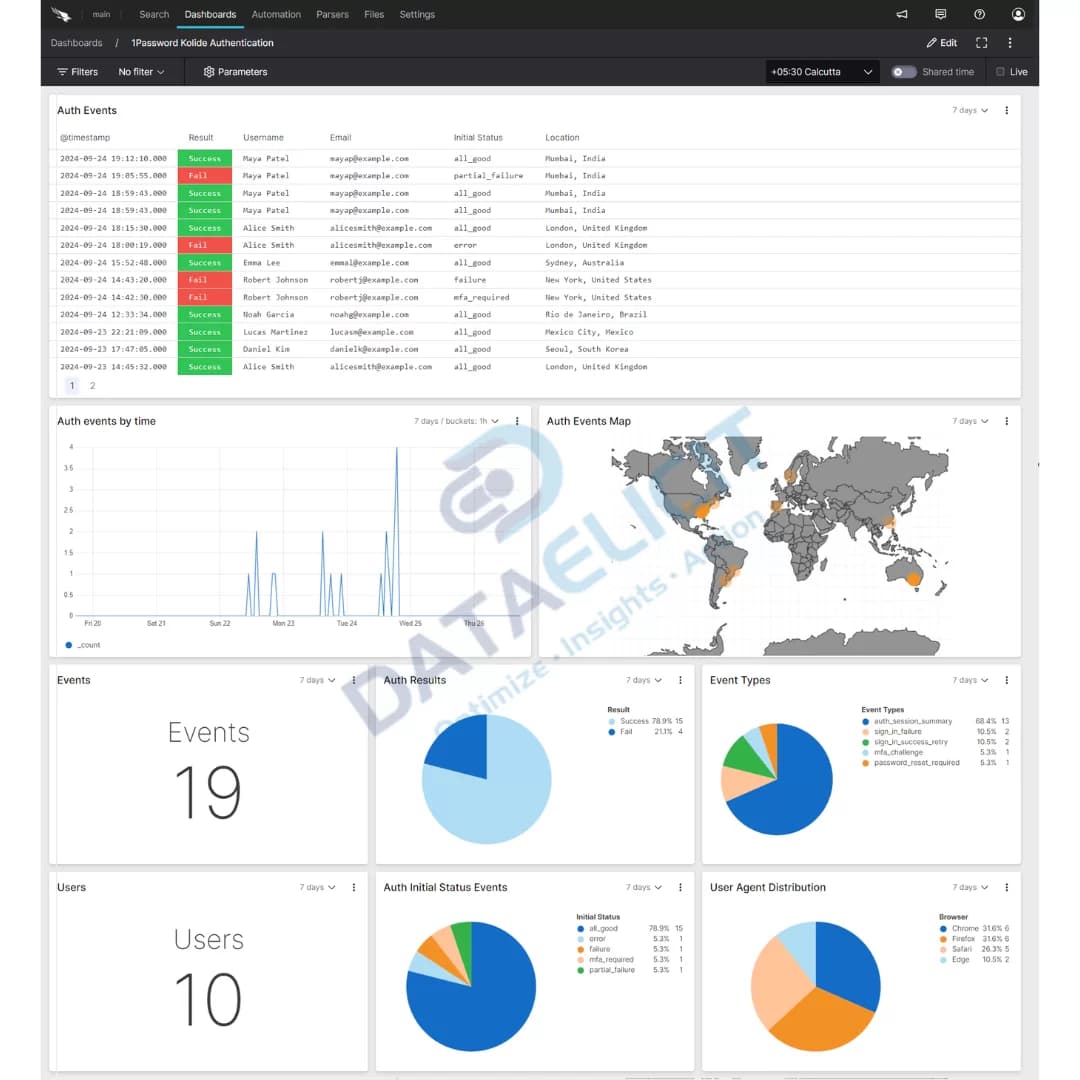
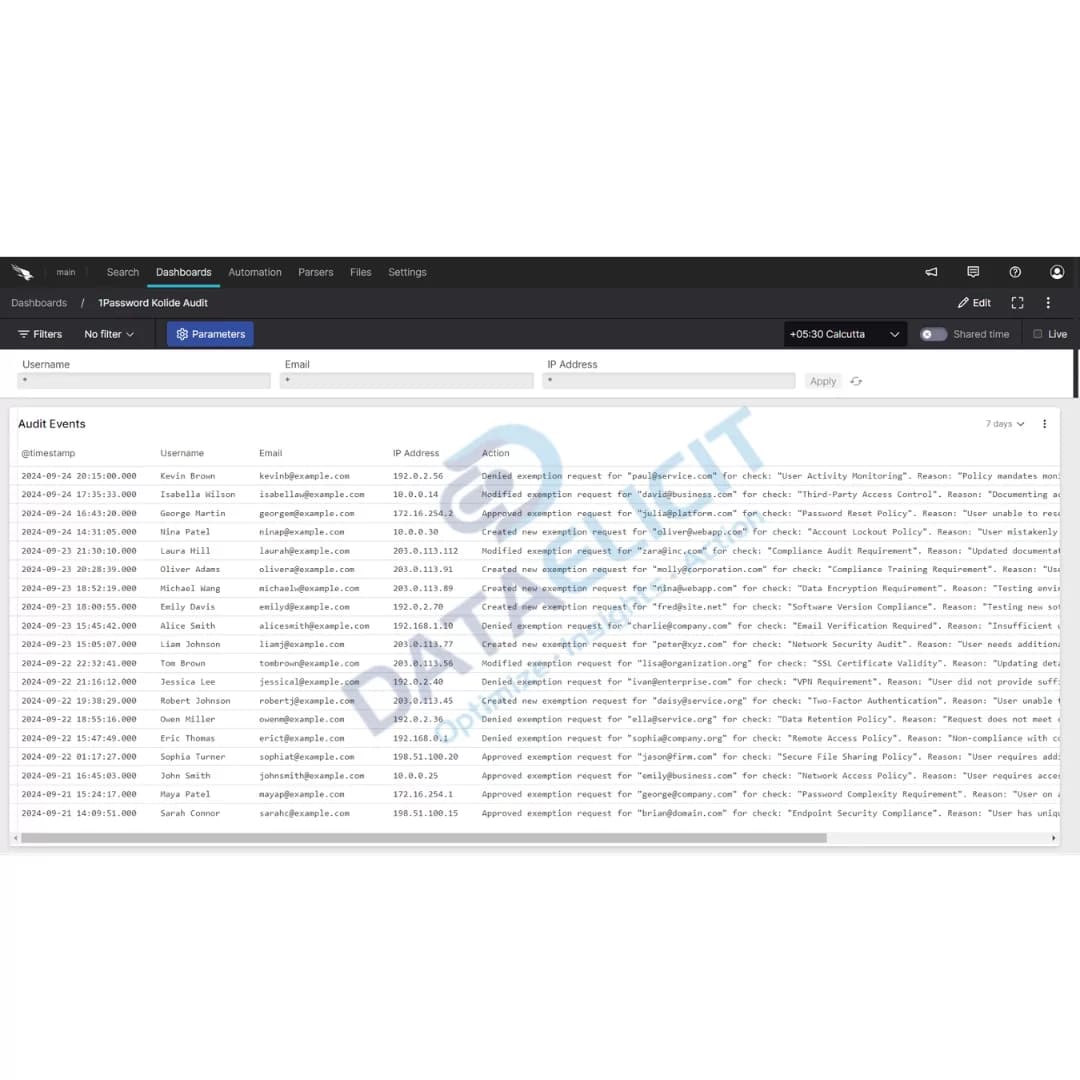
- ✓Audit views that show configuration changes, policy evaluations and device check results across your fleet.
- ✓Authentication panels that map logins to device health so you can see which access decisions were allowed or blocked because of posture.
- ✓Device trust posture reports that highlight failing checks, outdated agents and high risk device groups by team or region.
- ✓A starting point to blend Kolide events with identity provider, endpoint and VPN or ZTNA data already living in Falcon LogScale.
Once these views are live, Kolide logs stop being a side console. They become part of your main investigation flow: confirm which device a user was on, whether it met policy and what changed before and after a suspicious event.
Conclusion
Falcon LogScale plus LogConnector and the Kolide package give you a realistic way to use device trust logs as part of daily operations. Instead of separate tools for access, devices and investigations, you get one place to ask questions like who accessed this app from what laptop, whether that laptop passed checks and what changed before the incident. That makes it easier to improve your security posture, prove compliance and keep users moving without turning every exception into a manual ticket.
Ready to dive deeper?
In real engagements we start with where Kolide is already enforced, which applications are most sensitive and what your current access paths look like. From there we decide which log streams to onboard, how long to keep them in Falcon LogScale and which dashboards and alerts will actually be used.
Once ingestion is stable and the views are tuned, teams report faster answers during access reviews, smoother incident timelines and fewer arguments about whether a device was really compliant at the moment a risky action took place.
Talk to the team
Want Kolide logs to work for you, not against you?
We help security and IT teams design and roll out LogConnector driven pipelines from Kolide into Falcon LogScale, including parsers, dashboards and alert strategies that match how your environment is set up.
Get in touch with us today
to learn more about:
- ›LogConnector features and benefits
- ›The Kolide package for Falcon LogScale
- ›How LogConnector and Falcon LogScale can enhance your IT and security operations
If Kolide is already protecting your applications, you are generating high value telemetry about device trust and access behavior. With LogConnector and Falcon LogScale you can turn that stream into something that speeds up troubleshooting, incident reviews and quarterly access checks instead of another isolated log store.
Featured Articles
Explore more integration guides and packages that combine LogConnector with Falcon LogScale for richer security analytics.

Unlocking Key Insights from Akamai SIA Logs with CrowdStrike Falcon
Use LogConnector to centralize Akamai Secure Internet Access events in Falcon LogScale and correlate DNS and web activity with endpoint data.
Read More
Integrating Menlo Security Logs into Falcon LogScale for Actionable Insights
Stream Menlo Security isolation logs into Falcon LogScale so you can track browser based threats next to device and identity telemetry.
Read More
Enhance SaaS Security Visibility with the AppOmni Package for CrowdStrike’s Falcon LogScale
Bring AppOmni configuration and posture data into Falcon LogScale to monitor SaaS risk, access and misconfigurations from one place.
Read More