Gain Visibility into Netskope Transaction Logs with CrowdStrike’s Falcon LogScale
Netskope gives security teams deep control over how users access SaaS, IaaS and web applications. The transaction logs behind those controls are full of detail about users, apps, locations and policy actions, but in raw form they are hard to search and even harder to align with the rest of your security data. When LogConnector streams Netskope transaction events into Falcon LogScale using a clean schema, you get fast searches, repeatable dashboards and investigations that no longer depend on exporting CSVs from an admin console.
As organizations lean harder on Netskope to watch cloud usage and web traffic, having a clear view into transaction level events becomes critical. It is not enough to know that a policy blocked a session. Analysts need to see which user, which app, which device and what data volume was involved. The Netskope transaction LogScale package is built to convert that noisy log stream into a structured data set that analysts can pivot on, correlate with other tools and summarize for stakeholders without fighting the underlying format.
Parser highlights for Netskope transaction logs
At the core of this package is the netskope-transaction parser in LogConnector. It reshapes raw Netskope events into consistent, searchable fields. Key entities like user, source IP, destination host or site, application, browser and device type are all normalized and aligned with the CrowdStrike Parsing Standard so your searches feel familiar across other integrations.
- Extracts user identity, access method and location details so you can quickly see which users drive the most traffic and how they connect.
- Normalizes destination host, site and application data so you can track top sites, sanctioned versus unsanctioned apps and where sensitive traffic is heading.
- Carries policy actions and key metrics such as bytes transferred, request counts and verdicts, which lets you understand how controls are actually being enforced.
Dashboard highlights for quick insight
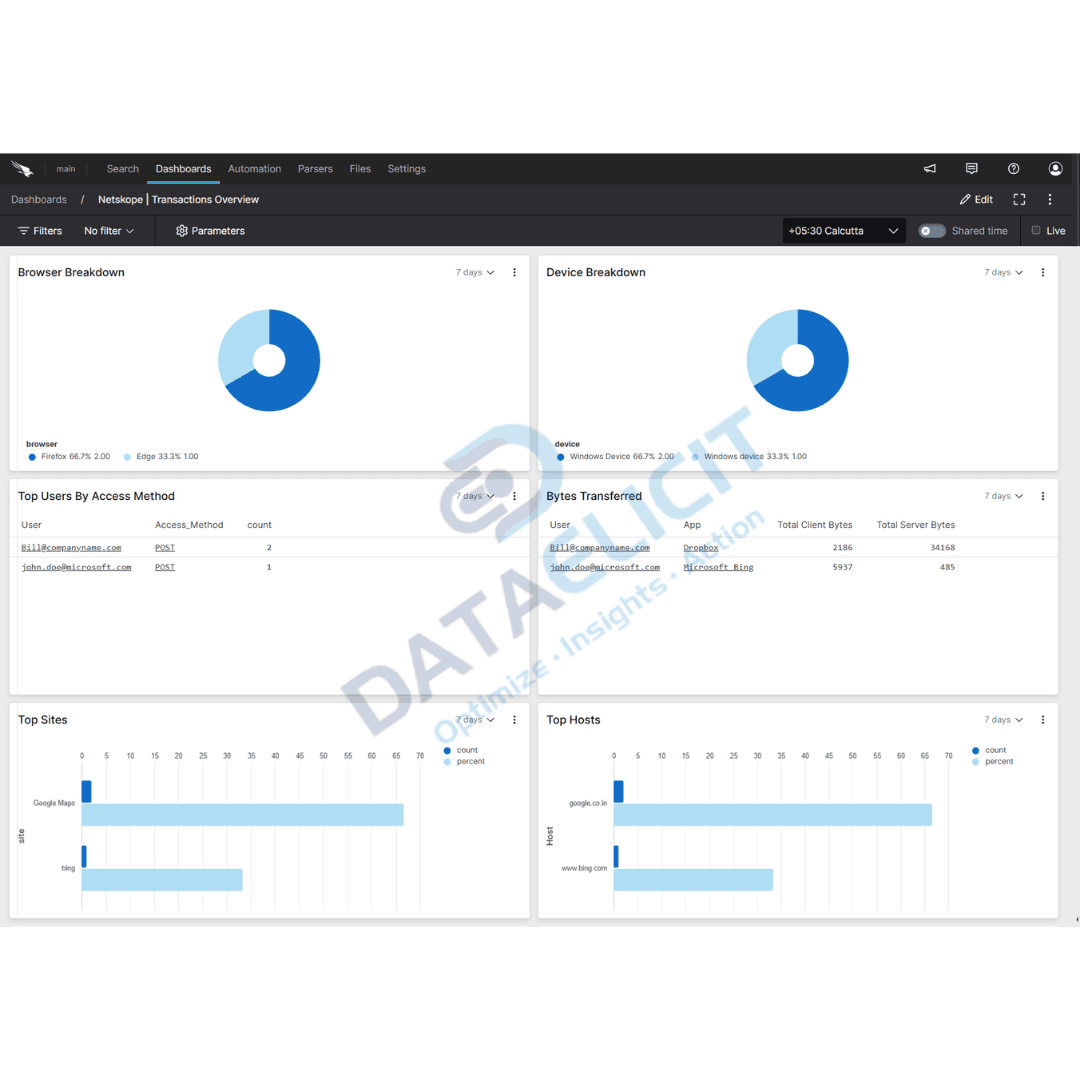
To keep your team out of the query editor for standard questions, the package ships with a Netskope Transaction Overview dashboard. It surfaces key metrics and patterns from your environment so you can see how people actually use cloud and web apps.
Core visualizations include views for:
- ✓Browser and device type breakdown so you can understand how users reach cloud services and which platforms carry the most risk.
- ✓Top users and access methods, highlighting accounts that generate the most traffic or unusual usage patterns.
- ✓Top sites and hosts accessed, together with bytes transferred, so you can see where data is going and which destinations matter most.
These insights help your security and compliance teams spot anomalous behavior, enforce acceptable use policies and produce reports with minimal custom work. The Netskope overview dashboard is designed to provide efficient visualization and quick wins as soon as data starts landing.
Why this matters
Without structure, Netskope logs tend to live in their own console, separate from the rest of your detection and response workflow. That makes it hard to answer simple questions such as which users moved the most data, which apps cause the most alerts or how cloud usage patterns changed after a new policy. By pushing Netskope transaction logs into Falcon LogScale through LogConnector you get consistent events that can be mixed with identity, endpoint and proxy data. That shortens investigation time and turns policy questions into quick searches instead of manual exports.
Conclusion
Whether your goal is better visibility into cloud usage, faster investigations or easier compliance reporting, the Netskope transaction LogScale package keeps things simple. With the netskope-transaction parser and the standard dashboards, analysts can unlock the value of Netskope logs straight out of the box. Combined with LogConnector you avoid home grown ingestion scripts and keep your focus on what the data is saying, not how to collect it.
Ready to dive deeper?
Each Netskope deployment is different. On projects we help teams decide how much transaction data to ingest, which fields to keep for long term analytics and how to connect Netskope dashboards with identity, endpoint and SIEM views. The goal is a setup that keeps answering questions without constant tuning.
Get in touch with us today
We work with security and networking teams that already rely on Netskope but want better analytics in Falcon LogScale. That usually means faster answers during incidents, clearer insight into risky usage and simpler reporting for compliance and leadership.
Once ingestion and parsing are stable you can track concrete improvements like reduced investigation time, cleaner policy tuning cycles and more confident explanations of how cloud traffic is being governed.
Get in touch with us today
to learn more about:
- ›LogConnector features and benefits
- ›Netskope transaction logs package for Falcon LogScale
- ›How LogConnector and Falcon LogScale can enhance your IT and security operations
Related Articles
Explore more integration guides where LogConnector feeds Falcon LogScale and Splunk with normalized telemetry for faster investigations.
Turn Box Logs into Actionable Insights with LogConnector and CrowdStrike
Ingest Box audit and access logs into Falcon LogScale through LogConnector so security teams can investigate content access alongside endpoint data.
Read More
Introducing DS Management App: A Faster Alternative to Splunk Forwarder/Agent
Use the Deployment Server Management App to centrally control Splunk app pushes and serverclasses instead of juggling manual config edits.
Read More
Enhance Certificate Audit Visibility with the DigiCert One Add On for Splunk
Bring DigiCert One certificate inventory and events into Splunk so you can monitor expiring certs, misconfigurations and risky deployments in one place.
Read More