Transforming Barracuda Email Security Gateway Logs into Actionable Insights Using Falcon LogScale
Email is still the easiest way to walk threats into an organization, which is why Barracuda Email Security Gateway sits in front of so much inbound and outbound mail. Its syslogs are full of detail about threats, policy decisions and user behavior, but in raw form they are noisy and siloed. LogConnector pulls these events into Falcon LogScale, normalizes them into a common schema and routes them into focused indexes so security teams can investigate campaigns instead of just counting messages.
Barracuda Email Security Gateway filters spam, phishing, malware and policy violations before they ever reach end users. That protection generates a constant stream of logs that describe threat origins, classification decisions and user level activity. On their own, these syslogs are hard to search and even harder to line up with endpoint or identity telemetry. Combined with Falcon LogScale you get fast search, cheap retention and a way to see email threats in the same place as everything else you monitor.
Introduction to LogConnector for Barracuda Email Security Gateway
LogConnector acts as the bridge between your Barracuda appliances and CrowdStrike Falcon LogScale. It handles ingestion, offset tracking and transformation, which means you do not have to manage brittle syslog collectors or custom parsing logic per device.
- Collects Barracuda Email Security Gateway syslogs, cleans up noisy fields and flattens events into consistent structures that are easy to search.
- Normalizes messages into the CrowdStrike Parsing Standard format so analysts can pivot on common field names instead of remembering Barracuda specific labels.
- Applies routing rules that keep high volume, low value events separate from threat rich data, which helps control storage costs and keeps searches responsive.
Parsing Barracuda logs and turning them into dashboards
At the core of the package is the Barracuda Email Security Gateway parser. It is built to understand the different categories of events Barracuda generates and to turn them into fields that map cleanly to investigations.
The parsers handle the heavy lifting:
- ✕No more hunting through raw syslog streams. Threat, quarantine and delivery events are aligned on sender, recipient, domain and campaign attributes.
- ✕Less time cleaning up timestamps, IPs and message IDs. Normalization rules keep values consistent so you can join data sets and build long term trend views.
- ✕Reduced risk when Barracuda firmware adds new fields. The CPS layout gives you a predictable place to store them without rewriting every search.
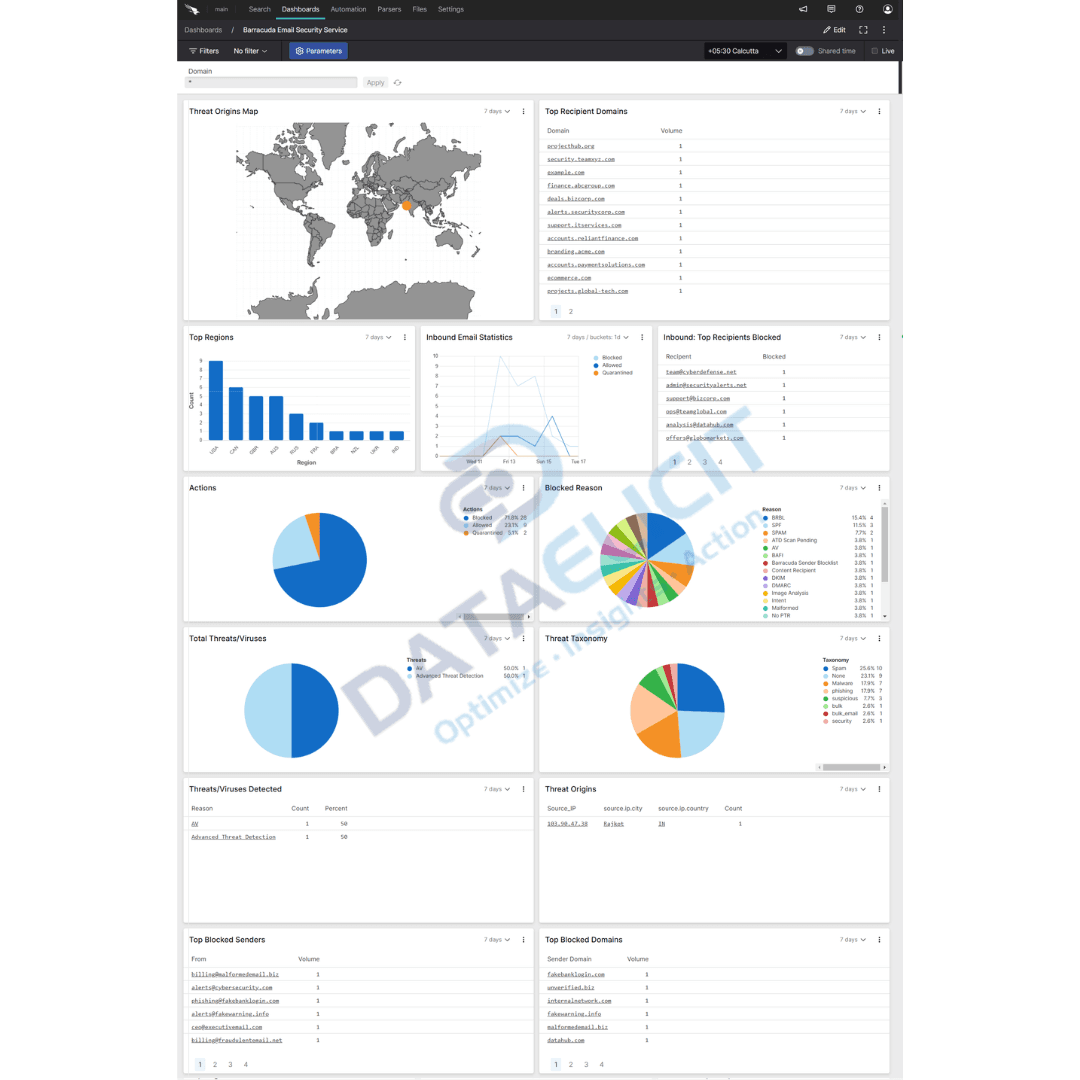
On top of the parsers sit pre built Falcon LogScale dashboards:
- ✓Threat origin maps that show where malicious traffic is coming from and which regions are most aggressive.
- ✓Threat and virus detection panels that break down blocked attacks by type, campaign and targeted users.
- ✓Inbound volume and sender or recipient statistics so you can spot abuse, misrouted traffic and unexpected spikes.
- ✓Domain and region statistics that help teams understand which partners or geographies demand closer monitoring.
Once these dashboards are in place, Barracuda logs stop being a flood of syslog lines and turn into a set of focused entry points: which campaigns are active, who is being targeted and how well your controls are holding up over time.
Conclusion
The Barracuda Email Security Gateway package for LogConnector and Falcon LogScale gives you a practical way to use email security logs instead of simply archiving them. With structured ingestion, a common schema and dashboards that match how email teams think, you can strengthen your email security posture, reduce risk and prove the value of the controls you already operate.
Ready to dive deeper?
This overview focuses on the core patterns. On real projects we help customers decide which Barracuda appliances and log categories to onboard, how long to retain them in Falcon LogScale and which questions matter most for incident response and email security operations.
Once ingestion is stable and dashboards are tuned, you can track concrete results: fewer missed campaigns, quicker answers when executives ask about phishing waves and clearer evidence when you need to justify Barracuda and Falcon LogScale spend.
Talk to the team
Need help making sense of your Barracuda email logs?
We work with security and messaging teams to stand up LogConnector driven pipelines from Barracuda into Falcon LogScale, with parsers and dashboards tailored to how your environment and policies are actually built.
Get in touch with us today
to learn more about:
- ›LogConnector features and benefits
- ›The Barracuda package for Falcon LogScale
- ›How LogConnector and Falcon LogScale can enhance your email security operations
If Barracuda is already protecting your mail flow, you are generating a detailed view of threats and user behavior. With LogConnector and Falcon LogScale you can turn that stream into something that speeds up investigations, satisfies auditors and provides evidence for every security decision you make.
Featured Articles
Explore more integration guides and packages that combine LogConnector with Falcon LogScale and Splunk for richer security analytics.
Enhance Certificate Audit Visibility with the DigiCert One Add-on for Splunk
Stream DigiCert One certificate events into Splunk so security and operations teams can track issuance, expiry and misconfigurations from one place.
Read More
Gain Unified Visibility Across Your Infrastructure with Zabbix Add-On for Splunk
Bring Zabbix metrics and alerts into Splunk to align infrastructure health, capacity and incident data with the rest of your observability stack.
Read More
Enhance Your Network Visibility with Auvik Networks Add-on for Splunk
Correlate Auvik discovery, topology and performance data with Splunk to understand how network behavior impacts users and services.
Read More